


Download your favorite YouTube videos
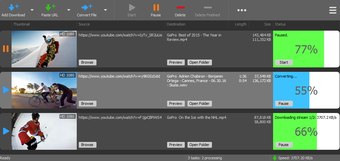
YTD is an amazing downloader that lets you save YouTube videos from the site itself to your computer. Downloading is made really simple and easy. To make things better, YTD will also allow you to convert your downloaded videos and clips to other file formats, giving you more chances to enjoy watching your videos using any media player you have.
Top Recommended Alternative

Simple and easy
Downloading videos through YTD is made really simple because all you have to do is to drag and drop your desired video from YouTube to the program’s interface and it will automatically begin downloading. There is also no need to worry about having limited options when deciding on what video to download because YTD will let you get any video regardless of length and quality. As long as they are available in YouTube, you can download 2K, 4K, and up to 8k high-quality videos. In fact, you can also save videos that are in 3D. Multiple downloads are made possible so you do not have to wait for one video to finish saving before starting another download. Even so, download speed remains 500% faster than than most downloaders because YTD has advanced download engines so you can immediately enjoy watching your videos. To better save you time and avoid wasting precious seconds of waiting, the app helps you ensure that you are downloading the right video by allowing you to see a preview. YTD lets you play the first bits of the video or clip that you are currently downloading so you can make sure that you have the right one and in the event that you got it wrong, you can cancel it then and there.
Convert your videos
You will not have any compatibility issues because YTD is capable of converting your downloaded videos to other file formats. Depending on your media player of device, you can transform videos into MP4, WAV, and more so you can play and watch them without any issues. What’s more is that you can also convert them to MP3, OGG, and other audio file formats if you do not wish to include the video itself.
Fast and convenient
YTD is one of the best downloaders out there because of it makes it easy and quick for you to download your videos without having to worry about any complications. This also makes it user-friendly. Being able to download any video in any quality while at the same time convert them to a file format that is compatible to your other tools is a great help.